Let’s bust some myths today because a majority of KDE 4 haters out there have the same reasons for hating it. I’m pretty sick of seeing posts and news articles about “why I don’t like KDE 4” and then seeing that the real reason the person is upset is because they don’t spend an extra few moments trying to figure things out…aka lazy and ignorant.
KDE 4 was NOT feature complete when it came out in the 4.0 version. It IS feature complete (in my opinion) with the 4.2 and 4.3 versions.
Ignorant Reason #1 – I hate Dolphin and I Can’t Have Konqueror Anymore
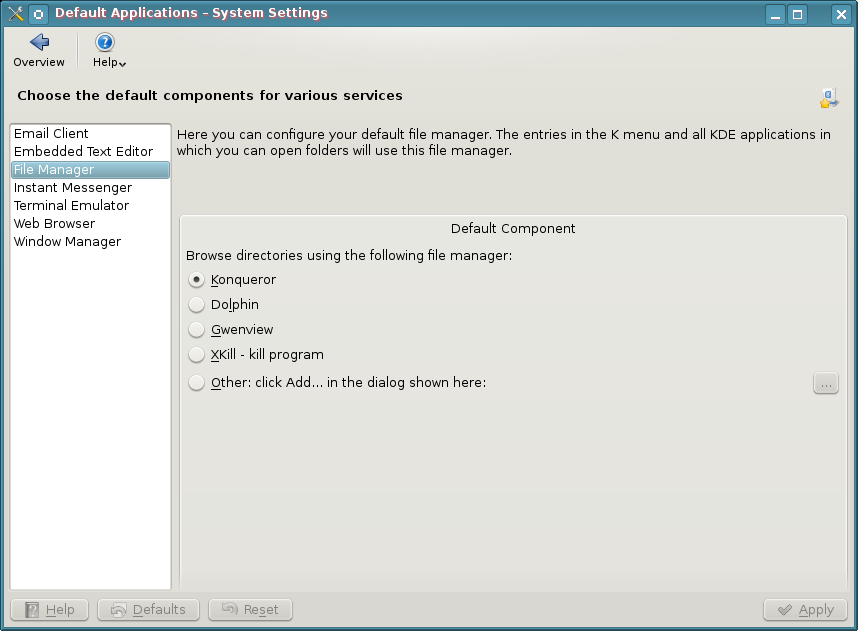 Wrong, you can use Konqueror. You don’t have to use Dolphin, but you’ll be missing out on a lot of useful stuff. Tell you what, now that you know that you don’t have to use Dolphin, why not use KDE 4 and give Dolphin a try every so often…you can still use Konqueror in the meantime and now that you know you can, you don’t have to go around trumpeting that you can’t to everyone who will listen and saying what a piece of crap it is. Forget that you’ll lose nepomuk and the semantic desktop by dismissing dolphin. Don’t know what that is? Let me google that for you…
I sure hope this solves many peoples beef with KDE 4 right out of the gate because this is one of the reasons I find all over the web. I really think the problem is the lethargic attitude that prevails from die hard KDE 3 fans. Honestly guys, give Dolphin a try…it’s really a pretty decent file manager and is light years ahead of any other DE file manager.
Ignorant Reason #2 – I Can’t Have Folders or Files on the Desktop Anymore
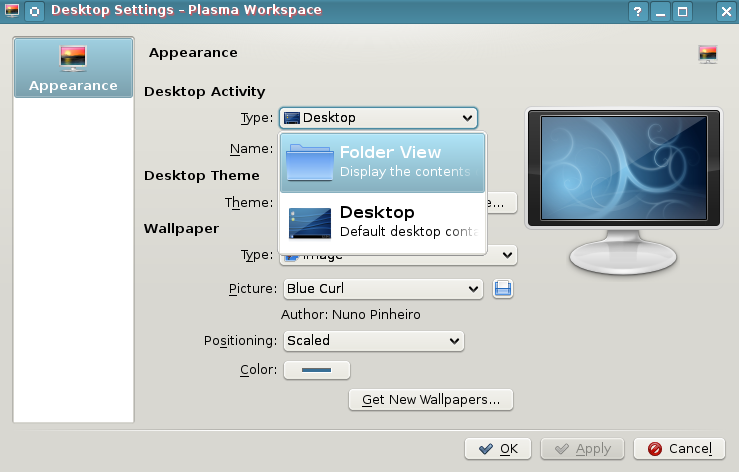 Wrong. Right click on the desktop and choose “Desktop Settings”. Select the drop down menu “Type” and select “Folder View”. Your desktop now has folders, icons, and all other such things that you may want to clutter it with.
If you want to switch back to NOT using the folders and instead use widgets…right click on the desktop and choose “Folder View Settings” >> Select Type >> Desktop.
To top it off, if you select “Folder View”, the folders and icons act exactly like you would expect them to in KDE 3. Not only can you select to show your desktop folders…but you can even show a folder like /home as your default desktop…show any folder you have access to, it’s up to you. Yay right? I give it a golf clap. Let’s continue thinking out of the box and bust a few more myths.
Ignorant Reason #3 – I Can’t Move My Panel to the Top, Right, or Left.
 Wrong. Click the settings icon on the right hand side of your panel (it looks like a comma on the far right side of the panel). The settings area pops open. On that bar is something called “Screen Edge”. Now, it seems pretty self explanatory that when you hover over the top of it, it gives you the 4 arrow icon that means you can drag and drop the panel wherever you want to…and being named “screen edge” seems to imply “which screen edge…left, right, bottom, or top…do I want this thing to appear on”. Then again, I can see how screen edge can confuse people when you open the settings of a panel that resides on the screen edge. Ok, maybe I can’t. Well, at least you know you can move your panel around right? Golf clap again? Who plays golf anyway?
Ignorant Reason #4 – I Can’t Resize Folders and Files in Dolphin
Wrong again. Are you sensing a pattern yet? Open Dolphin, go to the directory where you want to increase the folder size. Hold the control key down…now roll your mouse wheel and be amazed as the folder size increases. Invest all your money in Yet Another Linux Blog stock and move to Nicaragua. Golf clap on your way to expedia.com for purchasing tickets.
Ignorant Reason #5 – I Like to Use My Own Color Schemes…I Can’t Do That in KDE4.
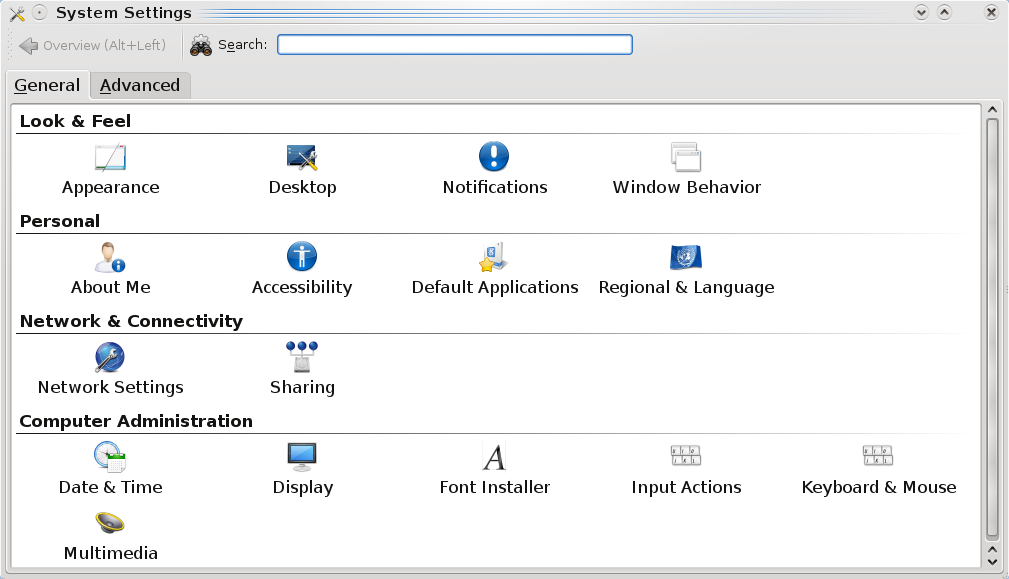
KDE4 absolutely allows you to create your own color schemes. It really helps to look around inside the system settings tool. Go to your Kmenu >> System >> System Settings. Once there, look for Appearance. You can also use the top search
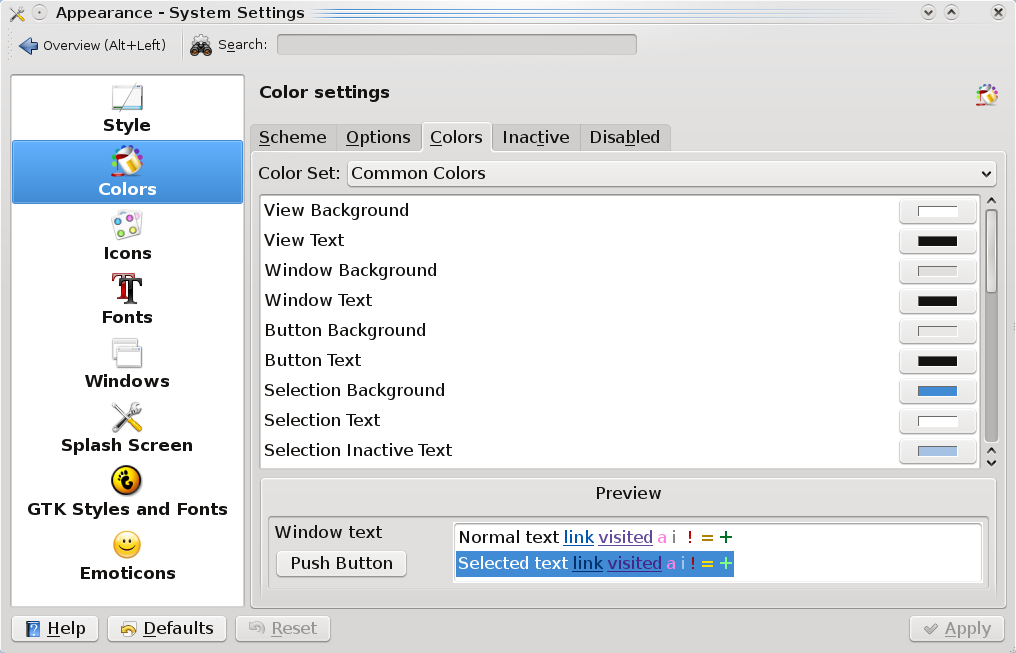
bar to look for any term…so if you were to type “color” there, you’d see that Appearance & Display are returned.
Click on Appearance and you’re taken into a wonderful world of color and granular control of said color. Change anything you’d like….go crazy. I hear pink is the new green…or is it green that was the new pink? Whatever. The only limits are your imagination. For those without imagination.
Ignorant Reason #6 – The Default Menu is Cludgy and Different and I Can’t Find Anything in KDE4
Now there is no right or wrong here…you could be right depending on who you talk to. However, the nice part about KDE4 is that they include the previous menu for you. Right click the Kmenu and choose “Switch to Classic Menu Style”. Now your menu is the exact same as it would be in KDE 3.5.10. Please remember that answers are out there…you just have to search for them.
Closing the Door on Myths
Hopefully, this closes the door on many misconceptions helps people who are ignorant to the leaps and bounds that KDE4 has made just in the past few months. I’ve grown very tired of journalists and bloggers taking swipes at KDE4 and spreading misinformation about it. If you have any questions about how to do something in KDE4, please leave a comment below and let’s work together in finding a solution.


I’m a KDE user since the beginning, a KDE advocate and really love KDE4 but I have to agree that 4 series are pretty less intuitive than previous series.
That could be a stopper for deploy KDE4 in some environments.
I can do everything in KDE 4 that I could in 3. Nothing is less intuitive…in fact, most things are more intuitive. Take for instance krunner…nothing like it in kde 3 and it helps me find things much more quickly than I could ever do with 3.5.x
I agree. KDE4 is more intuitive. I find myself using its default settings more and more.
With KDE3, I was never happy with the defaults from any KDE-distribution. KDE4 has changed all that. In fact, from what I read on their developer blogs, a lot of usability studies have been conducted and the results have gone into the development stream.
I guess at the end of the day, some guys will always hate change and that’s what moving from KDE3 to KDE4 is all about.
Ken, you’re right…just take changing the panel. There are many more clicks on doing this in KDE3 vs. KDE4…repositioning the bar from bottom to top can be done in 3 clicks…try doing that in kde3.
What I mean is, they really simplified and streamlined a lot of processes. I really like how much they’ve improved things.
Funny that you say so after writing this article.
Would users fall into “ignorance” if these features weren’t hidden in a not-so intuitive way?
Not-so intuitive is perspective based. Your perspective on what is not-so intuitive may not be what others perspective is…I find the ‘hidden’ (your word, not mine) features easy to access and in common sense places. I do this by forgetting about KDE3 and treating this as a new experience. Based on your perspective that things are not-so intuitive, I would be you’re not too happy with KDE3 reaching end of life and you expect KDE4 to be a carbon copy of it and since it isn’t, you call it not-so intuitive.
To give you background on what this editorial is..I’m basing it on what a majority of the posts in the KDE forums are about AND what a Linux journalist complained about a few weeks ago (link to his article in final paragraph) when he ditched KDE4 for Gnome. Each one of these myths above were reasons he gave for ditching KDE4.
My post was meant to draw correlation between this journalist, regular misconceptions, and what KDE4 really has to offer…it’s not what everyone is making it out to be and I’m tired of people treating it like Microsoft and shouting that it’s a gigantic turd when it isn’t.
Ignorance is also perspective based. That being said, I have nothing against KDE 4. It is great!
KDE’s performance and coding issues had a lot to do with Qt4. But, those have been ironed out over the last 18 months. I think that’s one thing people forget. It’s been 18 months since KDE 4.0 was released…and a lot of performance improvements have gone on under the hood. KDE3 is dead. Long live KDE4. I can’t wait until the codebase is moved to Qt 4.6.
I agree with Debian dude as well. The usability is so much of a joke, that I can’t tell if they are intentionally trying to make it unusable or if it’s all one horrific accident.
Have they seen windows 7 or OS X lately? You know what the difference is between that and this. You can do work on those without changing 20 obscure settings that nobody can find without google and 2 hours to waste.
I agree with you 100 %… the vast mayority of KDE4 haters out there are acting like the Windows fanboys that hate gnome because things are not in the place they are acustomed to have them… and don’t want to bother to figure things out!
I too quit using KDE (I’m a KDE user since Mandrake 8.0) when 4.0 came out, and I’m still using Gnome in my laptop, but have been keeping up with KDE’s development via Virtualbox, and when Kubuntu Jaunty was released I installed it in my desktop machine (KDE 4.2.4) to give it a try again, and I think that I’m getting the feeling of it again.
As they say about Linux: KDE 4 isn’t difficult… it’s just different!
There are some basics in GUI’s that are necessary for all the GUI’s since Xerox’s Lisa. The ability to create a symlink/desktop shortcut to an application. I don’t think we’re in windows fanboy territory here. We’re in a whole new “GUI that isn’t a GUI” territory here.
I see your point about not wanting to “learn nude tings”. And it’s a easy point to make. Learning new things is fine, but the fact that I have to do all of these gyrations to have a desktop that has basic functionality is not cool.
The thought of me doing all of this stuff above every time kde4 is installed bothers me enough to want to not use it. I appreciate all the work that was done, but really.. 5 minutes and 20 people off the street would have shown that usability is an issue here.
As my kind say, “Amen!”. Excellent post. I’ve been running KDE 4 since 4.0.1 (often riding the development version in between releases…) and it’s been an awesome, if sometimes frustrating, journey. Running 4.3 RC3 right now; awesome stuff.
Please tell me where to find the switch that turns off the Slow Motion Mode. Is there some box labeled “Disable needless delay” that I can tick to get back to the speed of KDE 3.10?
Yes.
Under Desktop in System Settings…Go to Desktop Effects. Once there, choose “Instant” animation speed instead of normal. Click Apply. You’re good to go!
Funny thing, I don’t even have the desktop effects enabled.
Maybe I wasn’t clear in my previous comment: I think that KDE4 is intrinsically slow on hardware on which KDE 3.5.10 wasn’t (the machine in question being my laptop).
KDE 4 slower than 3.5? in the hardware that designed for 3.5? then i would ask to u, does vista run as xp run on hardware that designed for xp? there are so much aspect to investigated here; such us your VGA driver, your configuration etc.
when you configured properly, you’ll have KDE 4 run at full speed like KDE 3.5 trust me, I’m already using KDE 4.2.4 at full speed and that with compiz activated, … shame on you 😀
Maybe you’re using the wrong distribution. Have you tried KDE4 with Pardus Linux? It boots right to KDE desktop quicker than Ubuntu. Everything feels much snappier than KDE3 actually.
openSUSE and Kubuntu have gained speed too. Of course, YMMV 🙂
Reason #7 it’s heavier than other systems such as flux and xfce.
Oh wait…
Yeah, because comparing it to other DE’s is dispelling myths about it. Thanks for correcting my logic.
Reason #8, it’s heavier than other systems such as flux, xfce, ice, etc.
The point is, hate (perhaps too strong a word) of KDE may in fact NOT be due to ignorance. I feel the same way about gnome.
The entire article has a holier-than-thou tone where ignorance or stupidity is the only possible reason someone could prefer earlier versions of KDE. Way to insult users/readers.
I did look up semantic desktop. I still don’t really understand how not using dolphin effects that.
if you notice, there is a link at the end of the article that takes you to the specific example of ignorance from a “journalist” who covers Linux for a publication. This is directed specifically at him with the hopes that others out there who agree with his short sighted and lethargic attitude snap out of it (through use of ranting and humor).
I dislike KDE for the simple reason that it’s like a gypsy woman wearing too many trinkets. I like a desktop with just enough eye-candy to let me do some real work on my PC.
Not anymore. Maybe you haven’t looked at the KDE desktop lately (KDE4 I mean).
Its as simple as you want it. However, its not restrictive like GNOME and you can spice it up with all bells and whistles (and trinkets) if you want to!
4.2 has taken KDE4 to a stable state. 4.3 is really the one to try out!
then gnome is your answer,… right on linux world there are so much option you can pick one of it
Good tips have not used KDE in some time, when I try it again I will definitely use some of the tips you mentioned.
Excellent post. I think Dolphin gets most of its flak because its extremely ‘heavy’ and can be a little slow. People like quick FM’s like Thunar. But Dolphin is by far the best FM available ANYWHERE if you want something that does everything and more.
I’ve said it before and I’ll say it again. KDE 4.2 should have been named KDE 5.0. Its that far ahead of 4.0/4.1.
I hate KDE4 because it’s even heavier than the previous version, which was already heavy… and on top of it, if it ain’t broke why mess with it? KDE 3 series was grand already. A total change was, imho, unnecessary. I truly feel that the only reason the current changes were made was to make the DE “prettier”… which is insanely, and ridiculously, trivial.
remove compositing. Enjoy it lighter. If you haven’t tried it without compositing then this argument isn’t an argument.
Prettier? No, that wasn’t the only reason. If you look at the code base from KDE4, you’ll see that it’s much easier to write code for…programs that took 20-50 lines of code in the past only take 10 now. The developers changed things not only to bring themselves into the future with Qt4, but also to make it easier on application developers and system builders. Eyecandy is just what lots of people like…it’s not the driving force behind KDE4.
the thing is, it’s not just heavier in RAM usage, it’s also very large in HDD requirements.
i understand rewriting things with more modern code practices, but why change everything on top? it makes no sense to me. this is like microsoft pushing vista down people’s throats when the populace wants xp. it may be technically better, but it isn’t what people want. they do not want to dig to find ways of getting things back to how they were, they want things to stay the way they were, period. i have left kde and gnome forever, because they both just keep getting larger, and changing in ways that aren’t pleasing.
i will go to lxde. k, thx, bai.
KDE is nothing like Microsoft olefowdie…seriously man, check yourself.
It’s great that you use Linux…but you should still support other free and open source software on top of that…for example, I am not a huge fan of Gnome but I still support it and recommend it to people as an alternative. I also use XFCE quite regularly and am an avid openbox fan. I don’t tout one over the other for anyone but myself. But seriously, KDE is not ‘like microsoft pushing vista down people’s throats’.
are you kidding me dude? on one hand you’re agreeing that the code is more efficient and slimmer, and the other hand you’re saying it’s bloated? what makes a program “heavier”??? more lines of code.
more lines of code = bigger programs
less lines of code = smaller programs
i do remember reading an actual memory footprint study of KDE3 versus KDE4, and KDE4 had a smaller footprint.
but, like everyone else, you have no actual data to back up your comments.
trolls
no, the thing is, KDE3 series was very modular. having used kde4 and kde3, I am standing by kde3. i have used it and loved it. it ran faster on all of my hardware, and used less space. the hdd requirements may have been lower simply because i didn’t install every single piece.
as for ram usage, kde4 has several daemons that are always running, and cannot be turned off. kde3 had a few as well, but not as many, and they were not as large.
on the other hand, the one thing i do enjoy about kde4 is pulseaudio. there were a few other things that involve hardware usage that i thought were novel… but really, i just feel that the a total change wasn’t necessary.
here is what i don’t like about kde:
to much configurability:
most application have these clickable and dragable nobs that allow you to change the layout of an application on the spot. is there a way to turn that off? they are distracting me because i keep hitting them by accident. i do not want my interface to change once i set it to the way i like.
kde leaves junk behind:
when i start a kde-app outside of a kde desktop environment, then a bunch of services are started that do not go away after the app is closed again but continue to eat memory (kde4, klauncher, kdeinit4). why?
kde4 may be reasonably feature complete, but not all apps ported to kde4 are.
at least kpresenter4 is missing things that kpresenter3 had, resulting in my presentation being unplayable correctly unless i keep the old version of kpresenter around. (btw: openoffice cannot properly play the presentation either, so much for odf being an open standard that works everywhere)
ok, so these are not exactly kde4 problems, yet they keep me from doing more with kde and i really wish for these problems to go away.
greetings, eMBee.
~Too much configurability.
Just click that thing with right mouse button and choose “Lock Toolbars”
Too much configurability?
Using your logic, I can state:
Here’s what I hate about the console!!!! Too many options and too much configurability!
Ok then…I forgot that I read them.
Ignorant Reason #1 – I hate Dolphin and I Can’t Have Konqueror Anymore
Konqueror uses the Dolphin engine for it’s filesystem management, so I may as well stick with Dolphin, there’s no point in using Konqueror as a Filemanager, so I haven’t tried to use it from that or indeed anything for a long time.
Ignorant Reason #1 part 2 – Forget that you’ll lose nepomuk and the semantic desktop
I’ve never actually found a use for the semantic desktop. it’s never made it easy for me to find anything, and I usually resort to the old way of finding things
Ignorant Reason #2 – I Can’t Have Folders or Files on the Desktop Anymore
I don’t Damnwell want Files and folders on my desktop. period. I’ve never used the desktop for anything not since Windows 95.
Ignorant Reason #3 – I Can’t Move My Panel to the Top, Right, or Left.
Of course you can. The problem with the panel is that it’s cludgy to use. It’s better thasn it was when KDE4 first casm out, but it still feels inflexible.
Ignorant Reason #4 – I Can’t Resize Folders and Files in Dolphin
I don’t want to. It’s stupid. It’s just as stupid as the same “feature” in GNOME. It gets in the way. Just give me a list. There are only two file managers that I’ve used that trivially give me a view of the filesystem like I want. Konqueror in KDE3 and Windows Explorer.
Ignorant Reason #5 – I Like to Use My Own Color Schemes…I Can’t Do That in KDE4.
You sure you aren’t creating strawmen. i can’t belive that anyone would be complaining about this. It’s trivially easy.
Ignorant Reason #6 – The Default Menu is Cludgy and Different and I Can’t Find Anything in KDE4
It is cludgy, thankfully they listened to people and made to pre KDE4 style menu available.
I have both Mandriva with KDE4 and Ubuntu with GNOME, so I get to compare the two. O the two, while GNOME has it’s drawbacks, it’s a more flexible desktop to use, It doesn’t have that restrictive cludgy feel that KDE4 gives me.
If KDE4 is, as you say feature complete, then I think they need a bit of a rethink.
tracyanne
BTW, if you clicked the link at the end of the article, you’d see I was addressing an article written by a Linux ‘journalist’.
All of the reasons I rebutted were his.
But thanks for taking a detailed time at giving your unique and personal take on things.
There are several things that seem half arsed to me about KDE4, the ablity to “personalise” the desktop, say for different types of jobs, but when you do it, it applies to all the desktops not just one. It used to be possible to at least colour code your desktops in KDE3, with different colours and or backgrounds, now you pretty much, don’t get anything more than what you can do on GNOME, all the desktops are the same just a different set of icons and widgets and colours, but on all of them. It looks like they got this bright idea, and then lost interest in it. It seems unfinished.
When you use those giant icon things… plasmoids, they have this horrible flyout menu thing that jumps out everytime you move the mouse over them, it’s looks ugly and it’s distracting. I considered using those things but they don’t really give me any usfull extra functionality, and as I’ve said it looks ugly when there damn menu bits keep flying out, it’s even worse than having icons on the desktop.
Actually, other than the “Desktop view” none of the other Plasmoids really seem all that useful.
Basically, the KDE team claimed, maybe they still do, that KDE4 is designed to enable you do use your desktop the way you want. It doesn’t. It forces me to work within the constraints they’ve placed on it. GNOME is actually much better at enabling me to work the way I want. Maybe one day.
Different activities for different desktops was/is possible since 4.2 IIRC, however the configuration option was considered experimental and therefore not exposed in the GUI ->
cf. the Plasma FAQ.
Starting with KDE 4.3, the corresponding configuration options are directly accessible (cf. for example here). Via that route it should also be possible to have different backdrops / wallpaper per activity.
And at the risk of telling you something you already know: The flyout menu should only appear if the desktop shell is unlocked ( Cashew -> Lock Widgets or Unlock Widgets respectively ). E.g. the idea is to lock the desktop and panel once you have everything arranged and configured to your liking.
quote::And at the risk of telling you something you already know: The flyout menu should only appear if the desktop shell is unlocked
Actually I wasn’t aware of that. I dislike icons on the desktop, and when the plasmoid things look to me like bigger more annoying icons I simply removed them. As a consequence I never experimented to find out. I’ll have a play with that cashew thing.
I am using KDE 4.3 RC2 from Debian Experimental and it IS quite nice BUT I still miss running Konqueror in Administrative mode (I guess I can always do ALT-F2 kdesu konqueror)
I thought I was missing “view in browser” in Akregator (an app I cannot live without) but “detach tab” solves the problem
In System Settings – Login Manager I don’t see Administrative Mode, is it missing or am I not looking properly ?
Just create a shortcut for kdesu systemsettings and you can go into the login manager in administrative mode.
Yeah, that was easy.
Wouldn’t it be easier for the end-user to have that admin mode, instead of a all-grayed out menu? Or does kde expect people to run it with administrative rights?
One thing I don’t like about kde4 is the meta-key. Still haven’t found it. I’d like to take advantage of the windows- and menukeys, but this doesn’t seem very easy, plus I couldn’t find info how to map them … in?
I can’t use KDE 4 as 3.5 replacement on remote desktop as it doesn’t work well on FreeNX.
Unfortunately, it’s true. I got NX installation with 35 clients working on KDE 3.5 daily, 8h a day. How am I supposed to convert to KDE 4 if over the NX link KDE 4 struggles to display everything on time? There are also many minor distortions, like black boxes here and there, aplications leave extra smug and mug and the machine itself is triple times as much loaded than when using 3.5…
I use KDE 4 since one month daily, on the desktop; previously I tried to convert myself about 8 times, but even though I was partly satisfied with options, I wasn’t because of its stability (remember, my people work 8 hours through NX, on 3.5 they do not experience and troubles for months without even logging out). KDE 4 is running up to few days and I need to logout – sorry, maybe I’m old timer Linux funboy, but that is how I perceive stability – I need extreme, I’m not closing my apps 3 times a week just to relogin.
That’s where KDE 4 really is – somewhere around the end of XX century.
Sorry, I’m still not fun of KDE 4. Once 3.5 is unusable, I will consider switching to another WM. I need to assure myself and my employees that they are working in right environment, so now I cannot predict if it will be KDE 4.
Now, I do not recommend KDE 4 to anyone using remote connections.
Ok, normally I wouldn’t even spam, but this rocks: just a minute ago keyboard stopped working in KDE 4, local desktop… It works perfectly in pure console (I did chvt 1 remotely) so its obvious KDE 4 has another bug.
Great? not.
Hi Guys. While I like KDE4 so far, there are still some things I miss from KDE3.5.
I really believe that KDE4 should not have moved from Debian Experimental repos before 4.3 As of my last update, (sidux) Kpackage still does not work correctly at all. Also, all virtual desktops use the same background. Not major problems, but minor ones, most of which should have been solved before KDE4 was released.
Excellent post. There was certainly a need to demystify some myths regarding this latest avatar of KDE.
How about the one thing in KDE3 that I haven’t found as easy in KDE4 (or even how to do it yet):
I love my customized menu when I right click the mouse!
This is slotted to be supported in KDE 4.3. I believe Fedora has patched their builds of 4.2 but I haven’t checked yet.
Fedora does have it, and it is why I said not as easy since I haven’t found out how to do it on just any old KDE4. Thanks for the info about 4.3!
Hi all
I love the KDE 4.2 DM. I agree it has a ways to go, but it serves as a modern and very functional desktop to me. I have nit picks, but then, KDE 3.5 is a VERY mature and proven desktop. Anyone recall running KDE 3.0??? It wasnt perfect either. As with all software, there are bugs, missing functionality and a host of hidden dramas mixed with variable configurations. I believe that the KDE 4 desktop will succeed.
As for plasmoids… they can serve to enhance your desktop and allow you to work with your computer the way you want. You can write custome plasmoids, adding functionality (use your imagination, email plasmoid, chat, call center desk plasmoid… you can go wild)
I have a question. I would like to size ALL of my windows so that I can still see my plasmoids loaded to one side of my screen, is there a way to do this? I’ve tried Application Window settings route, but, perhaps I dont understand how to tell it what I want. I’d appreciate any direction on how, or where to get the answer.
Thanks
Tsue
I don’t think I’ve ever tried to do that Tsue…I’d have to hunt quite a bit to find that one out.
I preferred KDE (3.5) on my older, slower computer. Marvelous experience. KDE is unusable. Slow, crashes. menu items going missing. Process running with no real purpose I know of (nepomuk) As as I can see, nepomuk is a technology in search of an application. Why waste cpu, memory?
Gnome is just as bad, though it performs reasonably well on my 1.8ghz, 512 memory dell optiplex gx260
Good thing though, I discovered XFCE via Xubuntu. I love it. Fast, responsive. Stable. I can even have some compositing effects. This runs like the KDE I experience for the first time with Simply Mepis, years ago.
Ignorant? No, just moving on.
I love-hate KDE4. I’m using it now. But answer this “ignorant reason” for the hate part: I cannot disable tap-to-click on laptop touchpads. Last I heard, no one was seriously attempting to port or make something similar to KSynaptics in KDE 3.5 which HAS the functionality. I’m on 4.2.4 at the moment, and I can’t even type this comment without having to correct accidental tap-clicks. So I can definitely say that 4.2.4 is not a complete desktop environment for laptops, and have no idea when (how many years) till it will be.
I miss the ability to narrow the toolbar so it doesn’t span the width of the screen.
I also wish that all of my icons in folder view wouldn’t spit out that dumb configuration bar when my mouse hovers over them. Same thing with the cashew…
If anyone knows how to fix either of these, please let me know!
First, right click your panel and select settings:

Next, resize using the arrows:

That should allow you to decrese your panel stretch horizontally. For vertical, just use the “height” link that appears on the panel settings. Dunno about the icons thing…it might be just in your installation…it doesn’t do it on Arch here.
I love it when people are visiting a thread that is meant to debunk myths due to ignorance, and persevere in being ignorant.
In this case, Tracyanne, you are flying the flag….
Myth 1: ‘
‘
Alrighty. try using activities. It allows you to use different work environments (activities) and at the same time having multiple desktops within that environment. Check it out.
Myth 2: ‘blockquote>plasmoids, they have this horrible flyout menu thing that jumps out everytime you move the mouse over them, it’s looks ugly and it’s distracting.’
Right click: lock widgets.
The rest of the post is just useless banter, so no need to debunk there.
I wonder, how on earth are we going to get more users from Windows to Linux, if existing Linux users do not even take the time to check out new stuff.
‘This car sucks, since I cannot even open the ashtray….’
‘Well, it has better mileage, more power, comes with standard climat control, electric windows, airbags, accident alert system, assisted braking, anti skid electronics, less maintenance required, improved reliability…. and instead of pulling the ashtray, you need to give it a gentle push and it will slide open.’
Jeez!
sorry, i didn’t mean to say that there is to much configurability overall, in fact part of what i like about free software is that in the end the source is the ultimate option to configure things. however, just as much i don’t spend time hacking on the source of the application i use, i do not spend much time to configure them either. most of the time i just want to get work done, and i do not want the configure options to get in my way. in short, i love configurability, but i do not want to have it all the time in my face.
to correct my complaint: there is to much visible configurability.
i want to hide it, and preferably have it hidden by default. or as an alternative, have configurability visible only when a window is opened for the first time. then i can adjust it easely to my liking, but after that, lock the adjustments in place, and require a menu selection to unlock it again.
btw: i didn’t notice the link to the other article, and even seeing the link doesn’t make it clear that your post is a point-for-point response to it, it might have helped to have it linked in the first paragraph, or even explicitly mentioned to be a direct response.
greetings, eMBee.
I don’t mind the usability gains or losses in KDE4. I for one actually love its interface. What I hate is that it is still unstable and thus not usable at least for me on my Lenovo z60t. My screen just freezes up when I use Krunner, frostwire takes forever literally 10-15mins to open in KDE4 only (I don’t have an issue with it in KDE3). Its stuff like that, that has left a sour taste in my mouth, not the usability issues.
I still use KDE3 though and I am waiting eagerly when some of the major distros like CentOS, Slackware and Gentoo use it as their default. Thats when I’ll feel fully comfortable using KDE4.
Hi Shane,
Lot depends on the distribution. I have KDE4 running on 4 different distributions on my laptop. There are quirks in all of them.
Kubuntu is quite usable. Pardus, IMO, is by far the most stable and very polished.
Don’t mind KDE at all, it got installed on my server, and works
well enough. Normally use Gnome though. And the question isn’t is
weather KDE4.0 is hateful, its weather is better than Gnome. Probably
purely a matter of opinion that. And I have to admit, my choice is far
more by laziness than, any aesthetics.
1. Just upgraded to 4.2.4 from 4.2.2 and the screen is a featureless checkerboard.
This has occurred to me on _three_ different systems with core2 duo as well as Atom chips with Intel graphics, using 32bit as well as 64bit packages. Somewhat of a showstopper.
2. When it did work, neither Konqueror or the disk-masturbation-exercise called Dolphin could access bluetooth (obex or sdp) protocols – as Konqueror could effortlessly do in 3.5.9 (Anyone satisfied with Dolphin reflects upon their requirements which must be quite primitive)
3. Under Mandriva (2009.0 and also the 2009.1, any update level), the plasma widgets fail on a regular basis. Konqueror, as well as Konsole Plasma widgets come and go as they please, with no visible reason for this. We terminate employees for that kind of behaviour.
4. The wailing and gnashing of teeth you regard as ignorance is coming from a very vocal and adept group of users who grew accustomed to a desktop which could be used for much more than what the great unwashed require.
If all you require is a system for fondling your hard disk and grazing the pastures of the internet, KDE4 is probably adequate.
But for those of us with real work on real data it is crippleware compared to KDE3.5.9
With features previously working in 3.5.9 being derided as merely ‘wishlist’ under the current KDE_4 developer perspective, the outlook for KDE’s competition is improving rapidly.
Blame Mandriva on that one…I’ve had nothing but good experiences with both Slackware and Arch.
I suspect I am not the only one who does not Hate KDE4 but regards
their premature abandonment of 3.5.9 as a hasty blunder of _epic_proportions_. (I revise – I do so loathe DOLPHIN!!!
almost as stupid piece of code as Gnome’s Nautilus)
===================================================
from http://forum.kde.org/viewtopic.php?f=29&t=62735
(Note the date-time stamp):
“aggregator
Forum Services
Offline
kde4 bluetooth files open 0.1 (KDE Improvement)
Postby aggregator » Mon Jul 27, 2009 11:00 am
Imagekde4 bluetooth files open 0.1
(KDE Improvement)
kde4 currently does not support directly open bluetooth devices in konqueror or dolphin , like it was in kde3.
There is a smal script for very powerfull gtk2 application blueman (let’s not discuss here that kdebluetooth4 is far away from something working at a moment)”
———
Great call – use Gnome-flavored tools to workaround a KDE fumble.
That is not a Mandriva issue, but perhaps the checkerboard crash is…
——————-
There is more uncertainty about this ugrade I just took to 4.2.4:
http://forum.mandriva.com/viewtopic.php?t=114701
————————
As for the wishlist, here is just one example:
http://osdir.com/ml/plasma-bugs/2009-07/msg02008.html
————————
We just wish they (KDE) would focus on functionality
instead of glamor, hype and just trying to be the latest and greatest.
This just about sums up the nature of the problems KDE has with their priorities: (from the KDE bug list):
[Note: This bug rates merely a ‘MAJOR’ (not critical) severity
171685 major HIGH Linu unassigned-bugs kde org NEW keyboard stops working in kde 542]
WTF?!? if the keyboard stops working there is something badly wrong!
The fix?
” ——- Comment #97 From Dave Bennett 2009-07-16 14:01:20 ——-
After an HAL update last week the keyboard completely quit working in KDE. I
could type on the login screen, but once KDE came up: nothing. I loaded
Awesome as the window manager under KDE and the problem persisted. I replaced
KDE with gnome and the problem disappeared.”
Read that again:
“I replaced KDE with gnome and the problem disappeared.”
That kind of bottom line is a hairy place when problems like this have been around for _Ten_Months_ without being assigned.
Quoting BUGZILLA:
“This list is too long for Bugzilla’s little mind;”
I’d see that keyboard bug as a HAL problem first before a KDE one…and I’d close it too. I’d do that if it was a gnome bug also. You can’t point at generic HAL bugs and the reluctance of a DE developer to “fix” it (as if they could) as evidence that they never fix things and suck with integration.
Also, I’m not sure that you realize that KDE4 had to completely rewirte bluetooth support because it couldn’t port KDE3 support across. Thus, bluez has been integrated into solid. Yes, it’s integrated.
Until 4.3, check here: http://www.kde-apps.org/content/show.php/kdebluetooth4?content=84761
If you want a really stable and well polished KDE4 distribution, you can’t go past Pardus Linux, which you can download at:
Pardus Download
The 2009 release comes with KDE 4.2.4 and system configuration tools that fit snugly into Qt/KDE4 interface. This is a welcome change from Mandriva which is trying to merge Qt and GTK+ tools with limited success.
Frankly, my personal view on Mandriva is that they have had a head-start as a KDE based distribution and they could have ported their system config tools over th Qt by now. Currently, their Qt/GTK+ tussle is heartbreaking, to say the least.
I’m really happier now to know that it just has been my ignorance rather than KDE4 itself sucking indeed.
Here are just a few random myth-candidates I run into today – I would really appreciate if someone could dispel them:
1) Right clicking the systray clock, I expect to be able to adjust it. Instead
That worked in 3.5, but not in 4.2.4 – am I wrong?
2) While we are there, clicking on settings, then timezones, what I get is an endless list of cities, without any grouping/filtering/ordering or search. AFAIR, in 3.5 it was grouped at least into regions/countries, and perhaps a map as well. Am I wrong?
3) When plugging in a USB disk in 3.5, removable storage applet popped up options to mount it, open it, etc. Now, with “Device notifier” I cannot mount it without opening a new Dolphin. Am I wrong?
4) I don’t really see a printer configuration under the new fancy, revolutionary system settings (something trivial in KControl). Am I wrong?
5) when I pull the panel onto the side (using the ‘Screen edge button’ as you
pointed out above), I actually get an unusable Task Manager, with all the task buttons unreadable. That was much better in 3.5 – not sure was it vertical fonts or something else. Is someone actually using a vertical taskbar? Am just ignore there, too?
6) adding a ‘Terminal’ widget to the panel, I expect a one-click access to Konsole, with some given settings. Right now it just pops up a menu with one single item in it.
7) In Konsole itself, there used to be a little button in the bottom to open a new tab. That seems missing now, so have to learn Ctrl+Shift+N or go to the menu for “New tab”. Am I wrong?
What I kind of like is krunner and the new ‘K’ menu – where search is integrated: it would be great to see that everywhere.
Could you mention anything else that you find more intuitive and/or usable than 3.5?
Cheers!
That functionality is now inside system settings…to adjust the clock/date you go there. This is less confusing IMO for new users since it is a ‘setting’. However, you’re right that it might be a bit out of place for us KDE3 types.
I think you’re right on this one. Not sure why it is the way it is…mine is in alphabetical order though so it was easy to find my location.
No, you’re right I think. You can also change your default file browser to Konqueror and open it in that. But you’re 100% correct on this…you have to open a window to get it to mount.
Printing is still being ported over to KDE4…as with other tools, it was a complete rewrite. 4.3 has a new build of KDEPrint with it so that should give you something to check out.
I think you’re right on this one as well…I know you can flip it to the left and right side…but you’re right in that your tasks are unreadable because they think they should be horizontal and not vertical. I don’t know the status of this in 4.3…and I’m not sure if a bug has even been filed on it.
Not sure about this one…I just drag and drop items from my kmenu down to my panel so that it resides there in a ‘quick launch’ fashion (1 click launch)
This one can be fixed by your distro of choice having good default settings. In Konqueror go to >> Settings >> Edit Current Profile >> Tabs and check the box for “Show New Tab and Close Tab buttons in tab bar” and that will give yout he handy button you’re looking for.
Activities! KDE Activities Explained. I find this feature powerful beyond anything of any DE out there. Of course, it’s much more usable than KDE3 desktops…BUT…it is a bit hard to ‘figure out’ so maybe not as intuitive. I also think the panel control is far and away better and more integrated in KDE4 than KDE3. Everything you need is right there for size, position, etc. Anyway, that’s a few off the top of my head.
Cheers for the thorough answer.
Sounds good, thanks for this.
I agree that default should have been the old behavior. (btw, this seems like that last think I ever want to parametrize- displaying one small button in an area with already buttons in it).
Wow, cheers for that. This does shed some new light on the exotic peanut on the upper left corner. Reading that article, that reminds me of Perspectives in Eclipse.. BTW, I’ve always used multiple desktops for different tasks – basically been happy about that.
Especially that you can assign keybindings to each desktop, that makes context switching easy. I could find a way to assign a key shortcut for a given activity – you have to click on the activity widget.. That makes me less productive.. The only way this really makes sense to me is that I can assign an activity to each desktop, a switch the two together automatically (as that article suggest).
Did I miss something? How do you actually use activities?
Hmm, I would have preferred not to be right, but learning KDE4 was focused in fixing problems while keeping existing features – this would have resulted in much less anger from the users and consequently KDE folks (haters’ haters).
From an earlier comment:
I hope that’s true. With this in mind, however, it’s hard to understand why all distros pushed it down to our throat.
I find even Debian (the most conservative distro?) rushed too much for that.
I hope that’s true. With this in mind, however, it’s hard to understand why all distros pushed it down to our throat.
Isn’t this the same with every open-source project? With each release of a distro — even the final ones, we have bugs in Xorg, openssl, GNOME and pretty much everything out there. Heck, even the kernel cops out on me!
Most distros have released fairly stable KDE (for instance, 4.2.4 and it works fine with no unwanted surprises and crashes.
Well, I’ve been really happy with Debian Testing so far. Or actually the problem is usually that it takes more time for them to pick up new stuff and obvious improvements – but I guess that’s the price of stability and robustness, and I’m ready to pay that price.
In this case, the problem seems to be that KDE4 is not an obvious improvement from the user’s perspective, and we didn’t have the choice to stay with KDE3.5. It would be an obvious improvement when all/most use cases of the old system are supported in the new one, plus more features/options/fixes.
(developers perspective is completely different: KDE4 is probably the way to go.. this conflict is hard resolve now).
That depends on the user really. I know of quite a few people that find KDE4 refreshing and an improvement in many areas over KDE3.
People who fear change are going to tout it not being an obvious improvement.
It took many years for apps to get where they were at KDE 3.5.x…I’d expect the same for KDE4. The problem once again is perspective…users want/demand their apps now, and when they aren’t there or aren’t exactly the same, they cry foul and say “KDE4 is a piece of crap!”
That makes me sad because lots of people have put in a lot of work to make KDE 4 the most advanced desktop in the world.
That’s exactly my point. I would call it an “obvious improvement” if it would satisfy the vast majority of existing users as well winning converts.
As it is, it’s a step back for many use cases (see most of my points above).
It’s just not about doing things in different/revolutionary/better way – I’m all for those, just as lots of others I guess.
It’s about loosing power in lots of cases (again from the user point of view), which is probably just a result of a rush to push it out (more than ignorance from developers, as one might be tempted to reply to your ‘ignorance of users’ point).
Exactly, and yet was there such controversy that time? I don’t remember these kind of nuisances from the early KDE3 days.
Again, there seems to be an agreement that “KDE 4.3 is going to be first version people should really switch to”. If that’s the case, that should be 4.0, and everything up to now is experimental, at least optional.
No, (some) users just want things working at least up to a level as before: not necessarily in exactly the same way, but with same power. That’s what I feel lost now.
Agreed, that’s really sad, they are probably great people otherwise. Let’s not mix these things: even the greatest people screw things up.
What’s also sad is: lots of great work to KDE3 the best and most usable environment feels lost because of the very agressive break in evolution.
Again, the problem isn’t about the change itself, it’s trying to fix things were good enough, breaking existing use cases and
the agressivity and ignorance the whole thing was pushed out (for which I’d really blame the distros more than anyone else).
So, IMHO it’s not fair to treat people not fully happy with result: stubborn retrogrades who fear from change.
(I really can’t be accused of that, been always eager to learn and use new stuff in general, also trying to love KDE4 long before it got into Debian sid).
“It took many years for apps to get where they were at KDE 3.5.x…I’d expect the same for KDE4. The problem once again is perspective…users want/demand their apps now, and when they aren’t there or aren’t exactly the same, they cry foul and say “KDE4 is a piece of crap!” “
Well, there you go, are you really saying that kde 4 is crap so put up with it ‘cos you’ve put up with crap before?
Here’s an analogy, you get a new pair of shoes, they don’t fit properly and are really painfull to wear, but, don’t worry says the manufacuter, just before they wear out they get nice and comfortable.
Sorry, my previous post seems to have missed the link to Pardus homepage. Here it is again:
Hmmm. The link tag does not work quite well. So, here is the home page of Pardus (not clickable):
http://www.pardus.org.tr/eng/
Fixed it for you 🙂 Hope that works 😀
Yeah, thanks!
Hi,
Nice article. What I miss in KDE4 w/r to KDE3 :
– an applet (plasmoid) showing the cpu and memory usage in the task bar. btw, the system monitoring plasmoids show nothing, even the cpu load is empty. sensors work because I can access the information via the CL but not in the plasmoid.
– I have not found how to move objects in the task bar and I’d like to be able to arrange them
I use KDE4 at holme, in the office I’ve kept KDE3, I’ll switch when I feel that I master it …
Thanks,
Michal
I used to be a hater, and I’ve been struggling with my ambivalence for months, I really think KDE4.3 could be the turning point for me. I’m running the third release candidate, and this just might be the first time I don’t go running back to KDE3. If not, I’m pretty sure that day will come. In fact, there’s no doubt in my mind that it’s going to be stunning.
KDE4 haters should be sure to try the “folderview” mode. It’s essentially the classic KDE desktop, with some real game-changing innovations. Sidux has very helpfully released a KDE4 CD with folderview as the default. With this new Sidux, KDE is starting to look like KDE again.
I suppose I’m admitting to being stupid, but I spent hours and hours (just “a few moments” trying to figure out KDE4. I installed every release, some of them several times. Right about now, with KDE4, is when someone like me should be confronted with KDE4. I think KDE4 is going to be remembered as one of the most important and groundbreaking projects of early FOSS– and one of the most badly botched software rollouts and public relations campaigns ever. A commercial product might not survive this sort of blunder, and the biggest problem was that they did just what you’re doing, they blamed the public for not getting it. That’s a losing strategy. Public relations means taking reponsibility for the public getting it.
Still, I’d rather the KDE team be brilliant at writing software and suck at promoting it than have it be the other way around, KDE4 is going to prove everyonewrong, including me.
I think when this journalist (the one you say is ignorant) complain about reason #4. Is taking about the possibility to resize files and folder individually not to zoom out or zoom in inside nautilus (using icon view). I use this resize ability to “tag” files for example if i Have 3 or 4 PDFs to read but they differ in importance i just resize them (is an easy way to remember which is more important), of course you have alternatives to do this. But the whole pint here is that different people prefer to do thinks in different ways.
The fact that you can change kde4 to act like kde3.5 is pretty much proof that kde4 sucks. You have to change all the things that the kde people thought are so cool into what was before because the things they thought are cool are crap. So you have to jump through arcane hoops to get a usable desktop. And I suspect that the people that say they love it aren’t doing much beyond surfing porn. That’s why they like eye candy, they are visually oriented. Dolphin is a disaster. Yes I can change it to make it better but Konqueror was way better. And to also disprove that the ignorant are the ones that hate kde4 I will quote Linus Trovalds, “kde4 is a disaster.” Linus must be very ignorant according to the author of this blog.
That logic is faulty…I can make a lot of wm’s look like Windows 98…but that doesn’t make them inferior. Quote linus all you want…change makes people uncomfy and whining..your post is as whining as it is uninformed. BTW, I don’t give twosquirts of piss what linus or ESR or SVN or anyone says is crap…I go out and make my own decisions on the matter. Taking peoples word for it is pretty lame and uninformed.
To be fair, I think that Linus was really saying that KDE4.0 was a disaster. He is a longtime Fedora/KDE user, and was upset some months back when the latest Fedora only offered KDE users an extremely deficient and immature version of KDE4. Who knows what he thinks now? I think his comments are worth paying attention to, as he seems a mature and understated individual who is not given to ranting without good cause. Perhaps he’ll change his mind when he sees KDE4.4 or whatever?
I’ve been using KDE every day for five years now – and I wish to continue doing so as I have loved KDE3. I am keen to love KDE4 too, sincerely, but over the past year I have found versions of KDE4 deployed (for example) by SUSE and Linux Mint quite difficult to handle and missing some functionality that I am used to. For all my deficiencies and the undoubted gaps in my knowledge and experience, I do not think my problems arise from ignorance and/or laziness on my part. More to the point, I use my computer for work (rather than as a hobby or for development), I have to fit my work in around a lot of family and other commitments, and it is hard for me to find enough time to do the online research that has been needed to make these interesting but immature versions of the new DE behave in the way that I want/need them to.
I can well believe that KDE4.4 or KDE4.5 will be awesome – perhaps KDE4.3 will be! The undoubted problems with the transition to KDE4 are not the fault, I believe, of the KDE devs. The mistakes have been made by distros such as Fedora which have imposed the new version of KDE on their users in an unstable and incomplete form rather than waiting for it to mature …
… or even giving people a choice. Full marks to PCLinuxOS here. They have not yet deployed KDE4, but when they do so I understand that it will initially be as an option which users can take by enabling a KDE4 repository. Perfect, so far as I am concerned. If a tiny (in terms of developer base) community distro can manage this, why not the bigger players?
KDE4 is definitely great! The only thing that makes me upset is that KDE4 needs more resources than KDE3 or Gnome. But I do believe this will be fixed in the near future. 🙂
I have no problem with KDE 4’s design. I actually find some of it rather nice, but the problem I have always experienced is random KDE programs exiting with SEGFAULTS or crashes. I just get tired of that and will go back to GNOME or XFCE. Once they get these bugs fixed, I will certainly give it another shot.
IMO, KDE4 has been usable since 4.2 (once KDE & nvidia worked out incompatibilities).
The Dolphin POS is another issue. I regularly use multiple systems so supporting fish or sftp is critical. Konqueror does, dolphin does not (as of 4.3, yep, just checked both).
But even if dolphin supported kioslaves I doubt I’d find it usable, just take a glance at it and all the wasted screen real estate. File managers are utilities, not primary applications.
Also that nepomuk daemon should be trashed by default as I see no reason in giving it a core (yep, I let it run for an hour taking a full core before trashing it). I’ll stick with find, thank you. At least konqueror doesn’t bitch that the stupid nepomuk ain’t running unlike dolphin…
Ron, I have been using sftp with Dolphin in 4.2. I have no idea why it does not work for you, but it should work.
My hatred of KDE4 has nothing to do with the features. I tried the KDE 4.0.x series and thought the look, feel, and features were fantastic. But there’s something really wrong with the efficiency of the code base. I can remove all the eye candy that I can find but it still doesn’t make much of a difference. For example, I really enjoyed using Kontact in KDE3, but in KDE4 it is so needlessly bloated and slow. There’s a major lag when just deleting emails in KMail! And Amarok is now noticably slower on my machine. I could go on and on with Dolphin, etc. Now those with more modern hardware (I am running an AthlonXP 1.8Ghz w/2 Gigs of RAM) probably won’t even notice, but having lag like that with simple tasks is just not acceptable to me. Gnome 2.26, even w/Compiz enabled is much snappier in general than KDE4. I just tried the latest 4.2 version, hoping that some things would be tightened up, but I was sadly disappointed.
If you have the hardware to handle KDE4 and don’t mind or don’t notice the slow-down, then more power to you. Coincidentally, I have the same sort of feelings on Vista/7.
Yea well you cant use the Kiosktool with KDE4.
I need that tool or something like it for KDE4.
Here is my system set up.
i have a win server 2k3 setup to host PXE boot for imaging of Fedora11 and WinXP (i know its kinda funny)
Anyways i have over 300 pc’s to image with just fedora and i need a way to lock down the desktops so the end users cant mess it up.
Any help or where can i find all the files after making the changes in KDE so i can move them to a rsynce server or some thing.
Any help would be nice. 🙂
Blah. Typical strawman arguments. You sure told those imaginary naysayers off, boy howdy!
I hate KDE4 because I dislike it. I can be more specific, but I can’t be more accurate. The problem is how I feel when I use it, which is ultimately uninspired. No, that’s not very helpful. Neither is telling people you’ve never met that they’re ignorant, based on 5 or 6 possible arguments out of dozens and dozens.
If you said something like “Don’t like KDE4? Not my problem.” It would come off as just as obnoxious, but it would be more truthful and more helpful. The problem with “free as in freedom” is that everybody else also gets to do what they like, and if the KDE team doesn’t want to take care of my favorite desktop environment, I need to deal with it. I’ve started keeping my own mini slax repository, and I’m making my own KDE3 live CDs.
I don’t like KDE4, but I support it as an important project for the future, and developers need to work on new stuff. Anything else would be a waste of their talents.
I wanted to thank the author for providing solutions to the issues that me and everyone else have with KDE4. In fact STEP 2 is the most important issue keeping people from using it.
Why in crap’s name would you do that to your GUI by default? WTF? Are they trying to alienate 90% of the population? Why the extra step to have a usable desktop? Bizarre and stupid don’t even begin to describe them.
The grandmother, mother, sister, and computer science student test would fail using KDE4. Who the hell would know you have to change your “type” settings on the desktop preferences, just so you can add an icon- when you can’t even change your screensaver there? Really? How fking insane can you be.
Thanks for the article but KDE4 is still a pile of sh|t.
“Hate” is not my attitude towards KDE4. I simply consider it to have been unfit for release back in 2008. I’ve tried it with Fedora 9 and found it lacking in two key areas – bridge documentation and Konqueror 4 features + performance.
I looked for and couldn’t find back in 2008 a simple recommendation on how one puts icons on the desktop. I stumbled across the fact that the fallback technique from KDE3 (put the app. links in the “Desktop” folder via Konq.) and reboot would do the trick. That and other tips (e.g. KDE3’s unified menu is now split [all apps. vs. recent apps.] in KDE4 thereby requiring two menu icons on the dashboard) would have made the transition easier.
The Konqueror in KDE4.0 was a cripple – it didn’t have its summary line (OI !). If that feature was added later then KDE4 is viable. The slowness of Konq. 4.0/4.1 and the large footprint icons were reinforcing annoyances. [NB – The icons in Konq. 4.x seem to have a very wide clear skirt around them. This makes it hard to find a clear space to click on so as to unselect everything.] Dolphin is useless because on long volume name systems the volume sidebar is unreadable. I did try to port Konq. 3.5.x to my Fedora 9 rig but ran into too many compile problems.
Another nasty problem is icon management. There doesn’t seem to be a tool that looks at my icon pointers (dashboard and logout menu) and tells me if they point to something valid. If they do or do not, it would give me a chance to either change the pointer or plug in a suitable icon to that spot in the list. Housekeeping tools (e.g. KDE/Gnome sync., icon pool tweaking, config. export/import/validate, etc.) seem to be a major blind spot for the KDE developers.
My thanks for the lock tip in the early part of this post. That should have been in the bridge documentation.
Main : KDE 3.4 (SUSE 10)
Test : KDE 3.5 (Mepis 7) and KDE 4.0+ (Fedora 9)
Sorry, I am forced to be among the haters because though my laptop meets the KDE4 requirements, I could never make it show more than the black screen!!!
Most likely this is caused by how the distribution you chose configured X. If I were you, I would download Mandriva 2010 and see how that works for you 🙂
I appreciate the huge amount of work that’s gone into KDE4, it definitely seems more and more stable. Full respect to the developers for that.
To be honest, I had even greater respect for the work the was done up to 3.5, when it was actually usable.
And they kept up usability and supporting existing use cases despite adding more features and candy gradually.
They resisted the temptation of the Big Rewrite, respected the merit of years of good work, usable applications (rather than screwing up everything).
In general, a rewrite should never be released unless it obviously doesn’t break existing use-cases. If it does, ignoring existing users’ feedback, the only one to be called ignorant is the project itself.
Many projects are falling into this trap (even one of mine), so I don’t really want to bash KDE developers for that. It was just a mistake, even if a very painful one.
(For the record, using KDE 4 since 4.1. I had plenty of time to get used to it – I really tried to approach everything with open mind – as opposed to ignorantly bashing on how stupid it is.
It’s now 4.3.2, the one that everybody has been waiting for(?), and I still find the it fundamentally unusable, especially Plasma).
In short, the more I’ve done all my homework, the more I hate to hate it..Sorry.
I used kde 4.3 for a month, now i’m again an happy user of kde3.5.10
Why?
Bugs everywere, from an easy copy/paste in dolphin or the inability to delete (shift+canc) files from time to time for no apprent reason (fired up konqueror from kde3 and no problem at all with the same files) to huge memory leaks (i have to kill plasma-desktop and restart it every hour).
I kept my pc up for a week with plasma-desktop open, no widgets apart from folder view and plasma-desktop memory footprint went up to 60% of the total memory (2GB); killed it and (magic!) here comes free memory again.
What i’m missing from kde4 now?
Well… nothing, really.
Wow, how did you do that? Which distro is that? Did you downgrade the whole system?
Depends on what distribution you tried it with…most developers don’t take the time to figure out if they have bugs or not when compiling from SVN for installs on their distro. For example, Mandriva 2010 is probably the best implementation of KDE4.x I’ve ever seen…you should give it a try and see what you think. I find that most of people’s gripes and moans are due to crappy packaging by distros and no time being spent on integration problems they might have.
I appreciate the huge amount of work that’s gone into KDE4, it definitely seems more and more stable. Full respect to the developers for that.
To be honest, I had even greater respect for the work the was done up to 3.5, when it was actually usable.
And they kept up usability and supporting existing use cases despite adding more features and candy gradually.
They resisted the temptation of the Big Rewrite, respected the merit of years of good work, usable applications (rather than screwing up everything).
In general, a rewrite should never be released unless it obviously doesn’t break existing use-cases. If it does, ignoring existing users’ feedback, the only one to be called ignorant is the project itself.
Many projects are falling into this trap (even one of mine), so I don’t really want to bash KDE developers for that. It was just a mistake, even if a very painful one.
/* For the record, using KDE 4 since 4.1. I had plenty of time to get used to it – I really tried to approach everything with open mind – as opposed to ignorantly bashing on how stupid it is.
It’s now 4.3.2, the one that everybody has been waiting for(?), and I still find the it fundamentally unusable, especially Plasma */
In short, the more I’ve done all my homework, the more I hate to hate it }-; Sorry.
EDITED for cursing by blog author.
I tried yet again to like KDE 4.
I simply cannot deal with it.
Dolphin is annoying. (shifting the file tree just pisses me off)
Klipper doesn’t work like it used to. (It fails to keep the last entry active).
Plasma sucks big *#*#*’s
Konqueror was fine the way it was. (Its almost unuseable now)
Widgets piss me off as well.
My favorite distro (MEPIS) now uses KDE 4 as the default. Its no longer my favorite distro. Gnome blows big ####’s. So now in order to have an up to date well supported distro with a reasonable desktop interface I have relented and went with Lubuntu (LXDE), even though I despise Ubuntu with a passion for their “Users are idiots and we will FORCE you to do it right” attitude.
KDE 4 gets the crapcan from me.
that’s not why i hate kde4… none of those reasons, i like reductionism, i am sort of tech and i don’t like eye candy…. i LOVED kde3….. it was sophisticated….. i have always liked Linux for it’s simplicity …. i am actually quite annoyed right now….. cause i was working and suddenly a menu tool-bar thing disappeared from dolphin from accidentally clicking on something .. kind of seems like kde4 is in a beta-testing stage somehow might take few YEARS to get the bugs out of it……
i am actually quite depressed, seriously…..
think whatever you want…. kde4 makes me depressed … i love kde3, a lot as it was
I used KDE4 for over a year, and then I happened to need a live CD for something. I chose Slax, and I found using KDE 3 such a pleasure to use that I now run KDE3 on all my machines, including the kubuntu trinity.
I finally decioded that I’m done with KDE4. I have ADHD, and I find the glut of unnecessary features to be frustrating and distracting. After three years, it’s probably time to assume that people know whether they like KDE4 or not, even of they can’t properly articulate their frustration.
Even though I can’t stand using it myself, I have a lot of respect and admiration for the hard work and ingenuity that went into KDE4.
The developers at KDE have reinvented the wheel and decided a polygon is more suitable.
My experience with KDE4 has been very disappointing, the menu is annoyingly difficult, title bars disappear under things making them inaccessible and now my panel has decided to shrink itself.
They need to scrap it and start from scratch.
I won’t be using KDE any time in the near future.
I agree with the blogger here when saying that most of the critics on KDE come from a superficial knowledge of the system. I have KDE on my laptop (Kubu 11.10) and I have to admit that initially it drove me nut. After some time you get you way around as with every other new system.
The real problem with KDE and Kubuntu in my experience is that is incredibly bugging. I have Bugs every 2 operation run (freeshly installed system with upgrades installed and no change made yet in the configuration) and there are few workarounds to be found for KDE on forums. The kTerminal is not as functional as Ubuntu for some reasons and there is a very high statistic of unsuccessfull attemps made in my experience to work a way with kT in KDE. It was as easy as saying squid on Ubuntu terminal.
I still prefer KDE over Ubu/gnome unity desktop though and so I am sucking it up with the cons.
It would be grat if I could use a KDE environment and Ubu gnome functionality on my laptop (it is never going to work though with my Asus eeepc 1015 PEM 2gbram and 320 gbHD dual core.. sounds great I know but it has many faults with desktop effects in Ubu .. compiz cube fucks up all the tme.. docks.. forget it).
I think the KDE4 experience has everything to do with who packages it up and puts the time to make it less buggy. As an example, Mandriva does KDE pretty good as does Fedora surprisingly. I have less bugs in those two distros and when I tried Kubuntu, it had all sorts of problems. I’ve also found Arch to do a good default KDE but you have to build that from scratch.
The bottom line is, search around. Don’t just stick with one distribution and think KDE4 is buggy…it’s not any more buggy than Gnome 3 🙂 Thanks for reading!
Hi
I agree with blogger too. KDE 4 very customizable in my opinion, unlike GNOME 3.
Its true that I have found it a little buggy, but nothing critical (it is more fine tunning).
My experience with KDE 4 is about half year.
Features which I liked so far are:
– activities!, I have setup 2 different activities (I would set it few more, but I am limited currently by hardware) and I like way that they work
– widgets/plasmoids/addons/applets!, call it however you want, they are great + if you really want you can use Screenlets too without problems
– design!, it looks great to me comparing to other desktop environments (exception is GNOME 3)
What I dislike is:
– bugs!, it have few bugs that I found, however they are not too much annoying to me currently, and I believe that they will be fixed in near future
– mouse in shortcuts!, it is impossible to set eg. mouse click as some shortcut natively – workaround is xbindkeys which I don’t like much, but it does the job partially
What I would like to see to be added is (besides implementing disadvantages):
– mouse gestures!, if you use Opera browser, you probably know what I mean
– better folder “auto-refreshing”!, in GNOME 2 I was used to folders which I am viewing currently to refresh automatically whenever there is added/modified/removed file or folder, this is not a case with Dolphin (it does sometimes auto-refresh, but mostly it doesn’t) – I am not sure is this a bug or not, so I putted it here
Also, I have to say that I tried years ago KDE 3, and didn’t liked it much so I picked GNOME 2, which I was using for long time. Now when GNOME 3 came out, I gave it a try, but I found it VERY uncustomizable.
Currently I am running KDE 4.6.5 (planning to upgrade to 4.7.3) on Debian Squeeze (with some packages from Lenny and Sid).
Regards
Drax
It’s still a piece of shit, it’s NOT kde 3.5 that was frickin awsome!
Opinions vary. I have found 4.7 to be wicked awesome.
Can someone tell me if it’s just Kubuntu? My titlebars dont change colors. Active and inactive titlebars are all the same color. It doesn’t matter what color I choose in the advanced settings (which I found myself soon after installing) This problem has been in Kubuntu for years. Any other distros run into this? Googling so far has not yeilded useful results. May have to download and install/live cd other distros just to see.
Found it. There was a huge battle between artitst and users over themes (Oxygen,etc) and window titlebars. https://bugs.kde.org/show_bug.cgi?id=160627
The link details a long disagreement between KDE artists who want desktop to look pretty and users who want to actually be able to distinguish between active/inactive windows.
Kubuntu has a workaround that may or may not be provided by people arguing:
System Settings -> Workspace Appearance And Behavior -> Workspace Appearance -> Window Decorations -> Configure Decortions (button) -> Fine Tuning -> [x] Outline active window title
I turn this on and get a colored titlebar in Air/Oxygen themes.
Give Linux Mint KDE a try. http://blog.linuxmint.com/?p=1927
I guarantee it will be a better experience than Kubuntu.
It is a desktop. I want to use a desktop to get to my applications and switch between programs. It is my applications where I actually work and where I actually play. I have no desire to spend a bunch of time trying to figure out how to get KDE like I had it back in 3.5. One of the things that I miss most about 3.5 was how EASY and FAST it was to get to configure it. I’m not going to spend days getting my desktop the way I want it. It simply isn’t worth it. So like many others I’ll be using Xfce. I don’t actually like Xfce, I certainly liked KDE 3.5 more (I actually liked it more than any other desktop I’ve used including every version of Mac and Windows and various Unix Desktop Environment) but like all sorts of others I’m taking refuge from KDE and Gnome to something that works good enough. Probably time to look at Trinity.
Eric Fitton
PS: Can I pin windows, can I auto hide panels and have them activate from the corners, is Kaskbar back? When everything works again can I trust the developers not to rewrite the entire system from scratch again?
I have been using KDE 4 for nearly a year. I had tried to use it in the past but couldn’t. The basic problem was the composite effects, which I successfully disabled. Then I haven’t been using Dolphin since day 1. And I have been using the classic menu and folder view. It works. As for the memory usage issues, I found it is better to start a new session (the default is to preload a session, compare 400+ MB for using a preloaded session vs about 100 for using a new session, i do not remember how i did it but loading a fresh session does make a noticeable difference). The thing I like is that KDE4 includes good looking memory sensors by default.
KDE sux sux sux.
all that crap about clean desktops is crap.
fuck the bastards that programmed this fucking POS.
I honestly cannot stand KDE… I used to prefer it over Gnome but, now it has just become a mess to use all around.
You cannot remove the stupid activity tracker and that’s just a mess!